
Certificate management without server strain or loss of efficiency: A reality check on Microsoft Cloud PKI
Security must not be allowed to hinder the smooth running of a business. To ensure it is maintained nonetheless, reliable identity verification is required for every device and every user. Certificates are the key tool for this and are ubiquitous in modern IT: for automatic login to the company Wi-Fi, for secure VPN connections, or for accessing internal services. Users are barely aware of them, but on the system side, these digital identity cards are presented and verified every time access is requested. They ensure that users and devices really are who they claim to be.
The administrative framework behind this is known as Public Key Infrastructure, or PKI for short. It is the system that issues, manages and, where necessary, revokes these digital identity certificates. A traditional PKI is one of the most complex components of an IT infrastructure. Even in medium-sized companies with a few hundred employees, the number of certificates can quickly run into the thousands – for laptops, smartphones, users, servers and network components, each with its own validity periods and renewal cycles. And that’s without even mentioning the various systems, identities and tools involved. Operating such a system requires detailed architectural knowledge, complex operational processes and management of the entire certificate lifecycle.
Anyone looking to set up a professional certificate management system for their end devices today, complete with the necessary management tools, quickly finds themselves in a maze of certification authorities (CAs), NDES (Network Device Enrolment Service) servers and Intune Certificate Connectors. Added to this are the ongoing requirements for operating system maintenance and high availability, which often involve more effort than is appropriate for the actual purpose. A typical worst-case scenario: an NDES server stops responding correctly following an update, and suddenly devices can no longer obtain new or renewed certificates. If existing certificates then expire, Wi-Fi authentication fails across the board. At such moments, the PKI transforms from a security tool into a business-critical risk.
This is precisely where Microsoft Cloud PKI comes in: it moves the certification authority to the cloud and relieves organisations of the burden of operating certification authorities for end-point certificates. But how far does this promise hold up in practice?
Would you like to discuss our Microsoft Cloud PKI solutions in person?
We’ll help you get a clear overview.
Microsoft Cloud PKI: The logic behind the solution
The basic idea is simple: Microsoft brings certificate management to the very place where many organisations already manage their end devices – directly within Microsoft Intune.
Instead of running their own servers, organisations use a private certification authority provided by Microsoft as a cloud service. Here’s an overview of how it works:
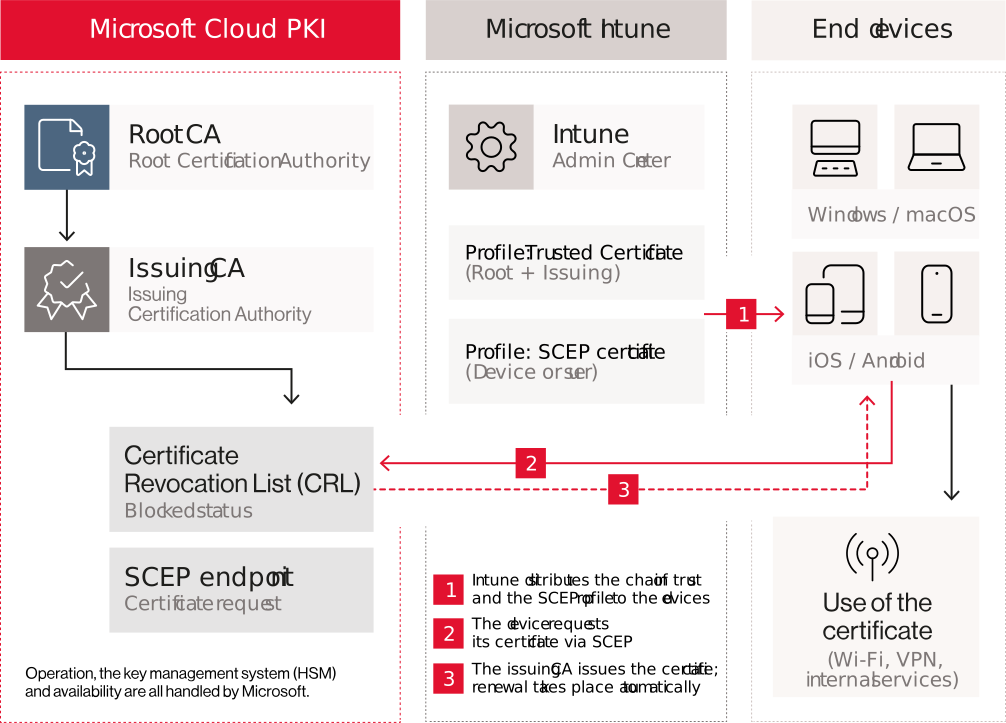
A root certification authority (Root CA) forms the basis of trust. A subordinate, issuing certification authority (Issuing CA) carries out the actual work and issues certificates for the end devices. Microsoft offers both of these services in the cloud.
Intune manages the distribution: via configuration profiles, the devices first receive the chain of trust (the certificates from the Root CA and Issuing CA) and then an SCEP profile. This enables them to automatically request their certificate from the SCEP endpoint of the cloud PKI. SCEP stands for Simple Certificate Enrolment Protocol, a standard procedure for automated certificate enrolment.
Windows, macOS, iOS/iPadOS and Android are supported. Important: As this is a private PKI, all devices and services involved must recognise the chain of trust for the certificates to be accepted. This also applies to the other party, such as the RADIUS server on the Wi-Fi network or the VPN gateway.

Why this solution appeals to so many people
For many organisations, cloud PKI transforms a cumbersome infrastructure project into a focused configuration project. The main benefits lie in the massive simplification it brings:
1. Less infrastructure overhead
For certificates issued via the Cloud PKI, local certification authorities, NDES servers and Intune Certificate Connectors are no longer required. This eliminates the need to operate, maintain and secure your own servers, as well as complex high-availability solutions. Exception: Anyone who continues to distribute PKCS certificates or imported certificates (e.g. for S/MIME) via Intune will still require the connector to do so.
2. Faster start
Whilst a traditional PKI often requires a planning phase lasting several months, a cloud-based PKI can be up and running within a short space of time. This saves time and resources.
3. Automated lifecycle
From issuance and automatic renewal to revocation – for example, when a device is reset, taken out of service or removed from Intune – certificate management is directly linked to the end-point device’s lifecycle.
4. Seamless integration
Anyone already using Intune will find it easy to get to grips with straight away. Administration, permissions and device groups are managed in the familiar Intune Admin Centre.
The business value is immediately apparent: rather than running, patching and securing servers, the IT team can focus on configuration. This can significantly reduce the total cost of ownership. Whether it is worth the investment, however, also depends on the licensing arrangements (see info box).
A comparison: Traditional vs. Cloud
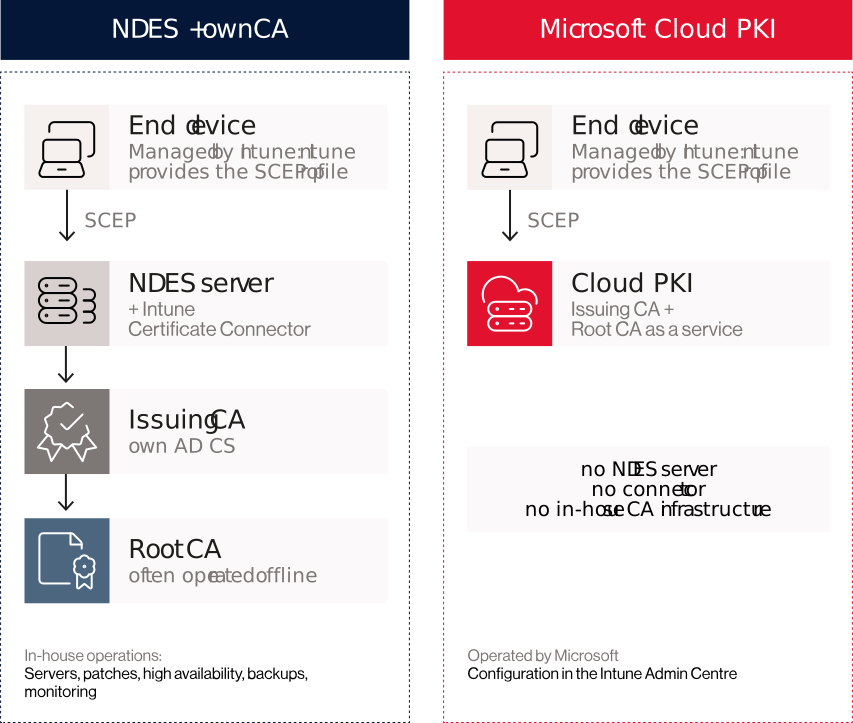
- Traditional PKI: Device → NDES server (with Intune Certificate Connector) → internal certification authority – all components hosted in-house.
- Microsoft Cloud PKI: Device → Cloud PKI SCEP endpoint – operated by Microsoft. In both cases, Intune provides the profile.
A word on licensing
To use Microsoft Cloud PKI, organisations must have either Microsoft 365 E5 – in which it has been included since August 2026 – or a licence for Intune Plan 1 or Intune Plan 2. Please check the exact terms and conditions in your current contract before starting the project.

A reality check: where the limits lie
Simplification always comes about through standardisation. And this is precisely where the limitation lies: Cloud PKI is a specialised tool for Intune-managed endpoints, not a universal replacement for every enterprise PKI.
Focus on Intune devices
The solution is designed for devices registered with Intune. It is not suitable for anything outside of Intune. This includes:
- Server certificates and network components – including the RADIUS server, which itself requires a server certificate in a Wi-Fi scenario
- Printers, appliances and industrial OT and IoT devices
- Linux systems and code-signing scenarios
Limited customisation
Anyone requiring custom certificate templates, approval workflows or proprietary protocols will encounter limitations. For example, the universal purpose ‘Any Purpose’ is not supported for security reasons. Furthermore, the Cloud PKI issues certificates exclusively via SCEP. The PKCS procedure, which is used, for example, for S/MIME encryption with key escrow, is not available.
Control vs. convenience
With a managed cloud solution, you relinquish some of the technical control. This includes, amongst other things, the selection of the HSM (Hardware Security Module for secure key management), the detailed cryptographic configuration and full access to all CA logs. Revocation checking is also predefined: the cloud PKI provides revocation information exclusively via a Certificate Revocation List (CRL); OCSP is not currently supported. Components that require OCSP are therefore not compatible.
Do you already know that Microsoft Cloud PKI isn’t an option for you?
Get in touch with us and join us in discovering further practical and tried-and-tested cloud PKI approaches.
The Bridge: Hybrid rather than an either/or choice
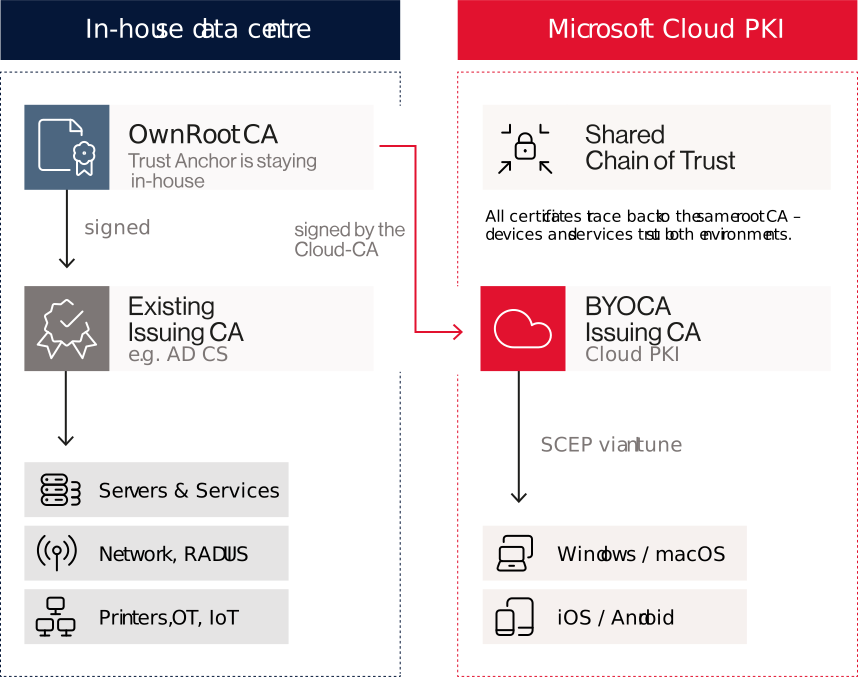
Anyone wishing to take advantage of the cloud but needing to retain an existing enterprise PKI for servers and other workloads can opt for the Bring Your Own CA (BYOCA) model.
In this process, an issuing CA is created in the cloud PKI, whose certificate is signed by the organisation’s existing root CA. The ‘trust anchor’ – that is, the top-level trust authority – remains in-house, whilst certificate issuance for Intune devices is handled via the cloud. Server, network and other non-Intune certificates continue to be issued by the existing PKI. However, both environments share the same chain of trust. This enables a phased modernisation rather than a risky ‘big bang’ migration. Please note: the organisation’s own root CA must continue to be operated for this purpose, so the savings on server operation will be correspondingly lower.
Conclusion: The right PKI is the one that suits your needs
Microsoft Cloud PKI makes setting up a secure certificate infrastructure for end devices considerably more efficient. The solution offers both technical and financial benefits, particularly for organisations using Microsoft 365 E5 that have standardised requirements and wish to reduce their reliance on on-premises servers.
However, as soon as certificates are required for servers, network devices or highly bespoke business processes, an enterprise PKI is still needed. In such cases, a hybrid architecture is often the better option: the cloud PKI handles the end devices, whilst the existing PKI handles everything else, all under a common trust anchor.
Key Takeaways:
- Efficiency: No NDES server and no connector for device certificates, thanks to Intune integration.
- Target audience: Ideal for standardised Windows, macOS and mobile environments.
- Limitations: Not suitable for servers, network components, IoT or highly customised templates.
- Flexibility: BYOCA allows you to combine the convenience of the cloud with your existing trust hierarchy.
In short: Microsoft Cloud PKI is not a PKI for every conceivable use case – but for the right use case, it may well be exactly the solution a business actually needs. The technology is merely a tool.
The key issue is the architecture.
Here at Comma Soft, we help you analyse your chains of trust and find a solution that not only works today, but will also remain scalable in the future.